Monday, March 31, 2014

Heard of Google Voice? Free Phone Line!


Google Voice Features

Have You Heard of Google Voice?

Great tool for Small Business! 

How to Use "Google Voice"

Step One: Create A Number
Step Two: Making a Phone Call


Google Voice is TOTALLY FREE at the basic usage level. 
Provides you with your very own number
Ability to call, text, email, receive voicemail and transcribed messages

How to set it up? 
Create a Gmail account, or use an existing one.
Sign in to your account and click on “More” on the top bar with a list of options  provided by Google – click on “VOICE” with the phone icon next to it.  
Google Voice
Google Voice Icon
Begin to set up the voice account following the prompts. You will have a choice to use  the existing phone number you own with your current voice carrier, OR, you can use a new number that will be provided by Google Voice. 
If you choose to obtain a new number from Google Voice, you will be asked to enter your current number. Google will then provide you with a code number and will note that they will be calling your phone number once you click “connect.” 
When you connect, Google will ring your CURRENT cell phone/landline and will ask you to enter the code number provided. They automated voice will prompt you to create a voice message. Once this is done, you will see a note on the screen that says, “Google Voice Number Verified.” 
You will then have the option to ADD more numbers if you have colleagues, and you can also set up a voice message system. Below you can read instructions on how to place a phone call! 


Download the App and call with your Mobile Phone!
To Place a Call via Google Voice:
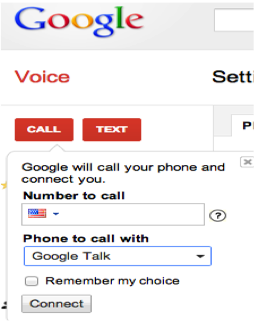
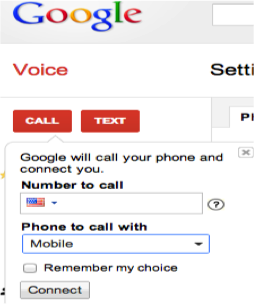
·       Click on “call”
·       Change “phone to call with” from Google Talk -> to Mobile
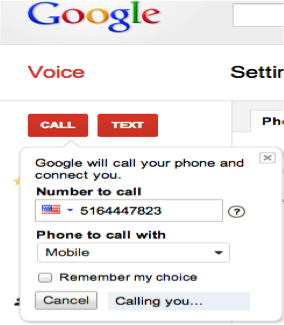
·       Type in the number you want to call
·       Click “connect”
·       Your regular cell phone will ring
·       When you pick up, you will here that your cell phone will automatically be dialing the destination you want to reach. The person you are trying to reach will see your GOOGLE number as the caller ID on their end.
·       If you want to be able to do this via your cell phone – go to the APP store, and download the Google Voice APP
Once you download the Google Voice APP, you will need to dial a specific number (depending on your service provider in order to create your new Voice Message) à This will be if you want to use the Google Voice Message as your message! –you can’t have both unfortunately it seems! If someone knows a suggestion or solution for this, feel free to share! Thanks for viewing! 
Follow the Steps To Call 

  _> > 

Monday, March 24, 2014

Reputation is KEY!


Grow Your Reputation!

As small business owners, especially those just starting out, we look to build our relationships. The relationships we want to grow are not only with our clients, but with potential clients, and with other business owners and network groups.
How to start working on your reputation Management?
  
      First Step: 
            Research yourself! Search your business name in the top search engines. Conduct an analysis on the results you find. What are consumers saying about you as the business owner and/or your products or service?
a.       Based on the findings you will know where you stand. Note: you may not have any results come up because you are brand new. This is actually not a bad thing because you have a clean slate to work with and can set yourself up for great success.
           Second Step:
      Create a plan! Decide if you are going to focus your outreach on a local market, regional market, or national market. Who is your target audience? What is the demographic? Do you have a specific gender, age group, income level, or perhaps business sector you are trying to reach? If so, you may want to consider geographic-targeting or content-targeting.
a.       Geographic-targeting (geo-targeting) allows you to focus on specific geographic areas even down to the zip codes.
b.      Content-targeting allows you to focus on specific content that people search by keyword or by website, by topic, or by phrase.
c.       Note: you can use these methods of practice via GoogleAd Words, Facebook Adwords, Display Ads, Search Engine Optimization, Content Strategy, Banner Ads, Video Advertising, and even traditional radio/print/television will allow for such specific outreach.
d. Add video to your website - then add the video to Youtube which is owned by Google. This can influence the positioning and ranking of your business on search engines because of the content (a smart investment)! 
3      Third Step:    
      Organize a budget! Come up with a budget that will work over a 3month – 6month period at the minimum in order to start seeing results. You should not expect to create a plan for one or two months. You need time to grow your content and let people start to know who you are.

          Fourth Step:     
           Measure your success! Keep track of what is working, what isn’t and what needs editing. Make changes as you go along. You can edit your keywords, your display ads, and your campaigns. If one campaign is performing much better than another, perhaps you may want to invest more money in that campaign. 

Fifth Step:
            Be Innovative! Never give up. Always strive for better. Continue to connect.

One more thing…
Just in case you checked out your business and you realized you may have some negative reviews or your information isn’t listed accurately:
*I can help you with that! Visit TrendSetter Communications and send and email!
Your Google+ Local listing is VERY IMPORTANT along with the other top 35 directories such as Mapquest, Yahoo Local, Bing Local, YellowPages, Yelp, etc.
You will want to make sure the information on those directories is accurate so that folks can reach you, visit your website, find out about updates, services, coupons, and most of all: YOUR BUSINESS!
Stay tuned for the next blog on how to fix inaccurate data!

Monday, March 17, 2014


Why Use Twitter to Promote Your Brand? 

Twitter is one of the most popular social media networking and information sharing websites available. It is a premier way to share your business updates, latest product designs, breaking news, and immediate offers in a quick and unlimited way. 


Positive Uses of Twitter:


  • Twitter is free (as long as you have an email address)
  • Business owners, bloggers, writers, entertainment specialists, and digital media specialists alike use Twitter to debut their content. 
  • Twitter can be used to market your own self-brand and expertise in a particular field so that employers, members of the media, and key influencers begin to notice you. 
  • You can link your webpage, article, or the websites of others to your tweets in order to establish relationships and connections. 
  • People can "re-tweet" your tweet. This means, if someone likes what you wrote on twitter, they can decide to re-post the tweet, also known as "re-tweet" on their Twitter page. This will increase your exposure to the crowd of their followers. 
  • Through Twitter, you can gain a fan base. You can begin to recognize who is interested in your content and would like to hear more about it! 
How to Succeed on Twitter:
  • Choose your Twitter Friends wisely - it is important to select "follow" on brands/companies/individuals that are relevant to your mission and may be interested in the same things you are. This will increase the likeliness of getting in to their conversation on Twitter.
  • Read the conversations that your followers and the folks that are following you are talking about. Pay attention to keywords and topics and use those keywords as #hashtags in your tweets.
  • Retweet relevant content - then introduce yourself to the person/business via twitter or via another social media outlet by sending a private message. Let them know who you are and that you enjoy their work and appreciate their tweet. 
  • Remain engaged. Start conversations, be relevant, post content often. 
You will be successful on Twitter as long as you continue to continue to engage! 

Sometimes Twitter may be a bit frustrating because you are limited to the amount of content you can write. You are only allowed to use a certain number of characters, not words, actual characters (!_+Abcj F ...all characters). Therefore, if you have a lot to say, Twitter forces you to make your statement concise and cohesive. To be quite honest, in a world where most folks have a VERY short attention span, Twitter has become the best way to get news out fast. 

Another part of Twitter that is helpful to someone seeking to gain awareness is the use of #hashtags! Hashtags are keywords that are relevant to the content you are writing about. Hashtags will link to keywords that are generating "topic buzz" and have an actual conversation going on. By putting your hashtag in to your tweet during certain times of day, during certain occurrences, you will gain more exposure for your brand/name because you may become part of the conversation! 

Monday, March 10, 2014

Business Networking Through Social Media


CommunicatingNOW!
Growing Business Relationships Through Social Media

As business owners it is absolutely necessary to establish relationships and continue to network – CONSTANTLY! We rarely use the traditional Rolodex. Instead, we have now moved on to using the digital contact list on our smart phones, Microsoft outlook, or whatever software we have. In today’s world, having a list of meaningful connections (people who you actually know) is invaluable. Some of the top networking sites to use are, Linkedin.com, Twitter.com, and Facebook.com.

Strategies on how to begin your connections:
  •  Create a profile about YOU as the business owner separate from the business.
  • YOU are the entrepreneur. It is nice to have an “About Jim Smith” page on your business website, however, do not focus the introduction of your website about how you started your business. Rather, focus your website intro on the mission of your business, products, services, and goal you will be providing to your target audience.
  • Linkedin.com: Create a profile on this business website as soon as possible! If you are the business owner, list yourself as either, President/CEO (whatever your title is) and link the company website to your Linkedin.com page. Links are important, so are video and project links. Feel free to include RELEVANT content about your website, products, and services that will attract people to your page.
  • After your profile is created, begin to search for people that you KNOW and have an established rapport with. Once you have connected with business constituents, you can see a list of suggestions for whom you may want to connect with. You may also receive connection invites to your inbox!
  • Twitter: First create a Twitter.com profile for your business. You can be the person that signs in to post updates on twitter or you may assign someone on your staff to update. This should be done daily, or several times a week depending on what type of business you run. *You may also want to create your own Twitter.com profile for your individual updates as an entrepreneur and you can include your business twitter handle in many of your posts (by using a hash tag).
  •   Facebook: This is where you can engage in conversation with your audience with unlimited characters and information (different from Twitter – which limits you to how much information you can post with each tweet). Create a Facebook.com business page. Include links to your website, to your Linkedin.com page, and to your Twitter Feed. You may want to list questions, conduct surveys, ask about products that are relevant to your business.
Social Media Connects Business Professionals:
  •    Once you have a Linkedin profile, a Twitter feed, and a Facebook page (in addition to your website or blog), you will begin to notice the connection count growing! Your contact list will increase tremendously. At this point, you can feel confident that if you have an event approaching, it will be a good idea to send an invite to your new connections. Your credibility increases with the greater number of meaningful connections! The more visible your business and profile is on the Internet, the more your reputation with grow.


Here is an example of excellent Business Professional Connection:
  •  I was recently connected on Linkedin.com to Melissa Cordial Schenkel, Public Relations Manager for Vera Bradley. Melissa noticed I am the author of a Digital Media/PR blog and invited me to a Vera Bradley event - which showcased the fabulous 2013 Baby Spring Clothing Collection (among other items)! 
  •  At this media event, I connected with a myriad of other media professionals including representatives from Broadband Television! 
*For more information on steps to start your social media, I noticed a great article in called, "Social Media Tips for Building a Social Media Strategy," published on Business News Daily on September 26, 2012. There is excellent advice in this piece. Check it out! 

Monday, March 3, 2014

Increase Your Website Traffic, How to Be Consumer Friendly!

Consumer Friendly Websites With Easy Navigation = More Time Spent on Your Website = Growth in Revenue! 

There is a great video available on SeachEngineLand.com that provides a brief tutorial on the basics of SEO. Let's start there. In order to optimize your website, you must:
  • Know Your audience
  • Create a title that is about the content/subject/service you offer
  • Include links to credible websites 
  • Post relevant content often - use Facebook and twitter as vehicles to engage with your audience. Starte conversations, find out what your customers want, need, and like. Don't be afraid to ask, it will be appreciated! 
  • Graphics should reflect your written content
The goal of creating a website, as a business owner, is provide a source for users to view your information so they can complete a transaction, find information from you as the expert, or gain something they were seeking. As a result, you as the business owner, will have the consumer loyalty if you have provided them with the information they need and the ease of use from your website. 

Making information too complex, and creating barriers in order to complete a purchase or transaction is not recommended. Consumer-friendly websites, that are simple, content light and contain relevant graphics are more likely to have a higher click rate. Transforming your website to a consumer-friendly website is most often a recommendation made by content strategists. 

Let's use a hospital website as an example.  Feel free to read this article I have drafted on:

"Patient-Centric" Websites, and Best Practices for Hospitals:

“Health care organization websites need to reach as many people as possible, the study said. This means the content should be accessible to those with low computer literacy levels as well as those who have physical disabilities that limit their ability to use a mouse or who use nonstandard browsers (Ford, E., PhD, 2012).”
Healthcare information disbursement over the years:
Innovative hospitals are moving away from traditional means of informing patients on complex medical data. Now, more than ever, it is absolutely necessary for patients to obtain healthcare information quickly and simply.
NOTE: (I would have wrote: clear and concise format, however, this is not the type of content we will be using in order to create a “Patient-Centric” site).
         · Hospitals are becoming increasingly aware of the digital revolution and the impact their website presence has on the publics’ perception.
         · Complex medical jargon is quite often too difficult for most patients to understand, the pamphlets and old brochures are being thrown away once the patient is home.
         · 88 Billion people search the internet per month, this is not discriminatory to patients who visit the hospital.
         · Hospitals are not as inclined to spend money on print and traditional marketing, instead, the surplus of information they can present on the web is much more COST EFFECTIVE.
         · Websites are consumers’ first point of contact with an organization in contemporary America. 
Why do hospitals need to change their websites to become more user-friendly?
       * In coordination with the latest healthcare reform guidelines, many ACOs (Accountable Care Organizations) are mandated to institute preventative health care practices. The goal is to provide the patients with as much information, resources, and tools in order to AVOID/PREVENT hospitalization and the READMISSIONS in the event a patient is in fact admitted.

        *How are hospitals/ACOs increasing awareness of their preventative efforts, seminars, videos, and best practices? THROUGH THE INTERNET! 
2

         · Patients are searching the web to find out healthcare information, searching definitions, and best places to go for the best physicians and the best healthcare.
         · Studies have shown that when the website is too complex, or even “sanitary” looking with HEAVY CONTENT, and not enough visual effects – the patient is inclined to leave the site.
        * Patients do not want to feel inferior and confused, especially when they are concerned about receiving healthcare or if their loved one may be receiving healthcare treatment. THEREFORE patients must be able to visit a site that makes them feel comfortable and helps them UNDERSTAND what their diagnosis is, navigate the page, and find information easily – in their language, not the language of a biochemist or the Chief of Medical Oncology. Patient-Centric vs. Physician-Centric and WHY THIS MATTERS!
        * Physicians are able to communicate in relativity to medical content in a highly complex way that for most people is far too advanced and quite confusing.

        * Patients prefer to receive information about their healthcare in brief statements, with common terminology associated so that they can have time to process the information and then follow up with questions.
        * It is IMPERATIVE to differentiate and separate the language on the website from physician to physician, vs. physician to patient. 
How to design the site? 
Providing Clear Direction!
         · Minimal heavy content à USE BULLET POINTS
         · Mix capital font with lowercase font
         · Use ONE consistent font
         · Increase visualization and video
         · Allow for whitespace – do not clutter the page – this makes the viewer feel overwhelmed and confused
         · Use terminology that would be appropriate for the 11th grade reading level
         ·Explain the information as if you are speaking to the patient, have a conversation with your reader 
         ·Use common words: (cardiologist = heart doctor), (podiatrist = foot doctor), (Oncology = cancer), (search by specialty = what does your doctor do? –or- What do you need help with, where is your pain?)
         · Make the navigation section EASY and APPARENT. Do not make your viewers SEARCH for your SEARCH? Get it?
         · Hospital and health system websites can also be improved on the technology scale, as many sites do not return clear descriptions of links to search engines such as Google and Bing that use webcrawlers to collect information. 
Case studies and proven success:


         · A recent article published in the Journal of Healthcare Management discusses the first study conducted to uncover the assessment of hospital websites and the impact on patient/viewer readership. The study included an evolution of 630 hospitals based on four major criteria: Accessibility, Content, Marketing, and Technology.

          · A study conducted in 2010 at the Department of Epidemiology, Rollins School of Public Health, Emory University, concluded that an effort to increase healthcare literacy by using an assessment tool to evaluate service areas concluded that consumers increase their literacy are more inclined to engage. 4

         · New Jersey Hospital Association created a “Consumer Website” specifically designed for patients with heart failure in order to provide them with a user-friendly website filled with information, resources, links, clinic information, and ways to follow up with care in order to PREVENT READMISSION. This has helped the providers as well because they can refer patients to the site for a wealth of information. 5
         1Hirsch, L., Gandolf, MBA, S. (7, May, 2012). Study: Healthcare website need updates as Hubs for patient engagement. Retrieved: http://www.healthcaresuccess.com/blog/healthcare-marketing- advertising/study-healthcare-websites-need-update-as-hubs-for-patient-engagement.html
           2 Schilhavy, R.A.M., Menachemi, N., Huerta, T.R., Ford, E.W. (2012). Effective US Health System Websites: Establishing Benchmarks and Standards for Effective Consumer Engagement. Journal of Healthcare Management, 57, 1, pg. 47
Hirsch, L., Gandolf, MBA, S. (7, May, 2012). Study: Healthcare website need updates as Hubs for patient engagement. Retrieved: http://www.healthcaresuccess.com/blog/healthcare-marketing- advertising/study-healthcare-websites-need-update-as-hubs-for-patient-engagement.html

         3MedCityNews.com published the results from the Journal of Healthcare Management and included the top 25 hospitals that scored the highest in accordance with the four evaluation categories. The list can be found here: http://medcitynews.com/2012/02/hospital-websites-study-lists-top-25-in-the-nation/ 

              4 Gazmararian, J. A., K. Beditz, S. Pisano, and R. Carreon. 2010. "The Development of a Health Literacy Assessment Tool for Health Plans." Journal of Health Communication 15 Suppl 2: 93- 101. 

                       5American Hospital Association (2012). www.aha.org. America’s hospitals: Caring for patients, strengthening communities. Committed to Quality and Safety. Retrieved from: http://www.aha.org/advocacy- issues/initiatives/quality.shtml
Hirsch, L., Gandolf, MBA, S. (7, May, 2012). Study: Healthcare website need updates as Hubs for patient engagement. Retrieved: http://www.healthcaresuccess.com/blog/healthcare-marketing- advertising/study-healthcare-websites-need-update-as-hubs-for-patient-engagement.html